Getting Started
Etsy Shop Setup Checklist: Everything You Need to Launch (2026)
By Jordan Ellis · Updated 2026-03-11
Table of Contents
- Why You Need a Checklist Before Launching on Etsy
- Understanding Etsy Fees in 2026
- Phase 1: Before You List — Foundation Setup
- Phase 2: Creating Your First Listings
- Phase 3: Launch and Promote
- Printable Etsy Shop Setup Checklist
- Product Photography Basics for Etsy
- Shipping Setup for New Etsy Sellers
- Branding Your Etsy Shop for Long-Term Growth
- Your First 30 Days: What to Do After Launch
- Etsy vs Shopify: Quick Comparison
- Pros and Cons of Starting on Etsy
- Frequently Asked Questions
- Sources and Methodology
Why You Need a Checklist Before Launching on Etsy
Jumping into Etsy without a plan is the single biggest mistake new sellers make. You open a shop, throw up two listings with phone photos, pick a random shop name, and then wonder why nobody visits your page for three weeks straight.
A proper etsy shop launch checklist keeps you from missing foundational steps that directly affect your visibility and early sales. Etsy's search algorithm favors shops that are complete — filled-out About sections, clear shop policies, multiple listings with strong keywords, and consistent branding all signal to Etsy that your shop is worth showing to buyers.
If you're asking yourself "what do I need to start an Etsy shop," the answer is simpler than you think in terms of requirements, but more involved than you'd expect in terms of preparation. This guide covers every single step so you can launch right the first time.
Understanding Etsy Fees in 2026
Before you invest time building your shop, you need to understand exactly what Etsy charges. The cost to start an Etsy shop is low compared to most e-commerce platforms, but fees add up if you don't account for them in your pricing.
Here is the full breakdown of Etsy's current fee structure:
| Fee Type | Amount | When It Applies |
|---|---|---|
| Listing fee | $0.20 per listing | Charged when you publish or renew a listing. Each listing lasts 4 months or until the item sells — whichever comes first. When an item sells, the listing is automatically renewed (and you're charged another $0.20). |
| Transaction fee | 6.5% of sale price | Charged on the item price plus the shipping cost you charge the buyer. This is Etsy's cut of each sale. |
| Payment processing fee | ~3% + $0.25 | Charged by Etsy Payments (their mandatory payment system in most countries). The exact percentage varies slightly by country. |
| Offsite Ads fee | 15% of sale price | Only charged if a buyer finds your item through an Etsy offsite ad and purchases within 30 days. Shops earning under $10,000/year can opt out. |
| Etsy Ads (optional) | You set the daily budget | Only applies if you choose to run on-site advertising. Minimum budget is $1/day. |
| Currency conversion fee | 2.5% | Only applies to international transactions requiring currency conversion. |
Example calculation: You sell a handmade candle for $25 with $5 shipping.
- Listing fee: $0.20
- Transaction fee: 6.5% × $30 = $1.95
- Payment processing: 3% × $30 + $0.25 = $1.15
- Total Etsy fees: $3.30 on a $30 sale
That leaves you with $26.70 before your product costs and materials. For a deeper dive into every fee scenario, see our full Etsy fees breakdown.
Phase 1: Before You List — Foundation Setup
This phase covers everything you need to do before you publish a single product. Rushing past these steps leads to a weak foundation that's hard to fix later.
Step 1: Choose Your Niche and Validate Demand
Don't try to sell everything. The most successful Etsy shops are focused. Pick a niche where you have either skill, passion, or a clear market gap. Search Etsy for your product ideas and study the competition:
- Are the top sellers getting consistent reviews (a sign of steady sales)?
- Can you differentiate on quality, design, price, or speed?
- Are there search terms with high volume but low competition?
Use Etsy's search bar to see auto-complete suggestions — these are real phrases buyers type. Tools like eRank (free tier available) can give you monthly search volume estimates for specific keywords.
For inspiration on profitable categories, check out our guide on the best products to sell on Etsy.
Step 2: Create Your Etsy Account
Go to etsy.com and click "Sell on Etsy." You'll need:
- A valid email address (use a dedicated business email if possible)
- Your country, language, and currency settings
- A shop name (3–20 characters, no spaces or special characters)
Shop name tips: Your name should be memorable, easy to spell, and ideally hint at what you sell. Avoid names that are too generic ("CraftsByMary") or too restrictive ("BlueWoolScarves"). Something like "ThreadAndTimber" or "SunlitCeramics" gives you room to grow while remaining distinctive.
Check that your chosen name isn't trademarked and that matching social media handles are available. Consistency across platforms matters for branding.
Step 3: Set Up Etsy Payments
Etsy requires most sellers to use Etsy Payments, which accepts credit cards, debit cards, PayPal, Apple Pay, Google Pay, and Etsy gift cards. To activate Etsy Payments, you'll provide:
- Your legal name and address
- A bank account for deposits
- Your date of birth
- A valid credit or debit card (for paying Etsy fees)
- Tax identification (SSN in the US, or equivalent in your country)
Etsy deposits your earnings on a regular schedule — typically every Monday for the previous week's sales, though you can request a deposit sooner for a small fee.
Step 4: Set Up Your Billing
Your Etsy bill (listing fees, transaction fees, advertising costs) is charged to your payment method on file. Bills are issued on the first of each month for the previous month's charges. Keep an eye on your Payment Account page in your Shop Manager to stay on top of costs.
Step 5: Write Your Shop Policies
Buyers check your policies before purchasing — especially for higher-priced items. Complete these sections thoroughly:
- Processing time: Be realistic. If you need 3–5 business days to make and ship an item, say so. Under-promising and over-delivering builds strong reviews.
- Shipping policies: Specify carriers, estimated delivery times, and whether you offer international shipping.
- Return and exchange policy: Decide whether you accept returns, and under what conditions. Transparency reduces disputes.
- Privacy policy: Required in many regions. Etsy provides a standard template you can customize.
Step 6: Build Your About Section and Shop Story
The About page is one of the most underused sections on Etsy. Buyers on Etsy specifically seek out makers and small businesses — they want to know who's behind the products. Include:
- A photo of yourself or your workspace
- Your story: how you started, what drives your craft, what makes your products different
- Your process: a brief look at how items are made
This isn't vanity — it's conversion optimization. Shops with completed About sections consistently outperform those without.
Phase 2: Creating Your First Listings
Your listings are your storefront. Each one needs to be optimized for both Etsy's search algorithm and human buyers.
Step 7: Write SEO-Optimized Titles
Etsy's search engine weights the first few words of your title most heavily. Structure your titles like this:
Primary keyword + descriptive detail + secondary keyword or variation
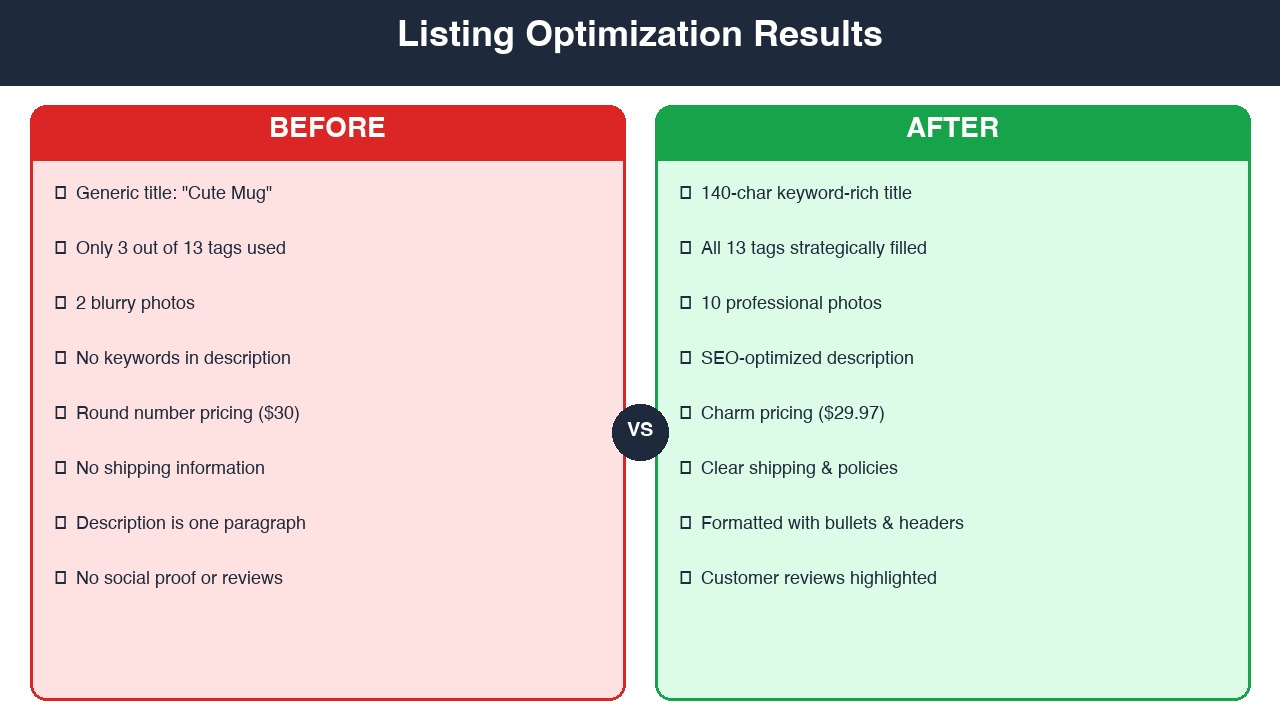
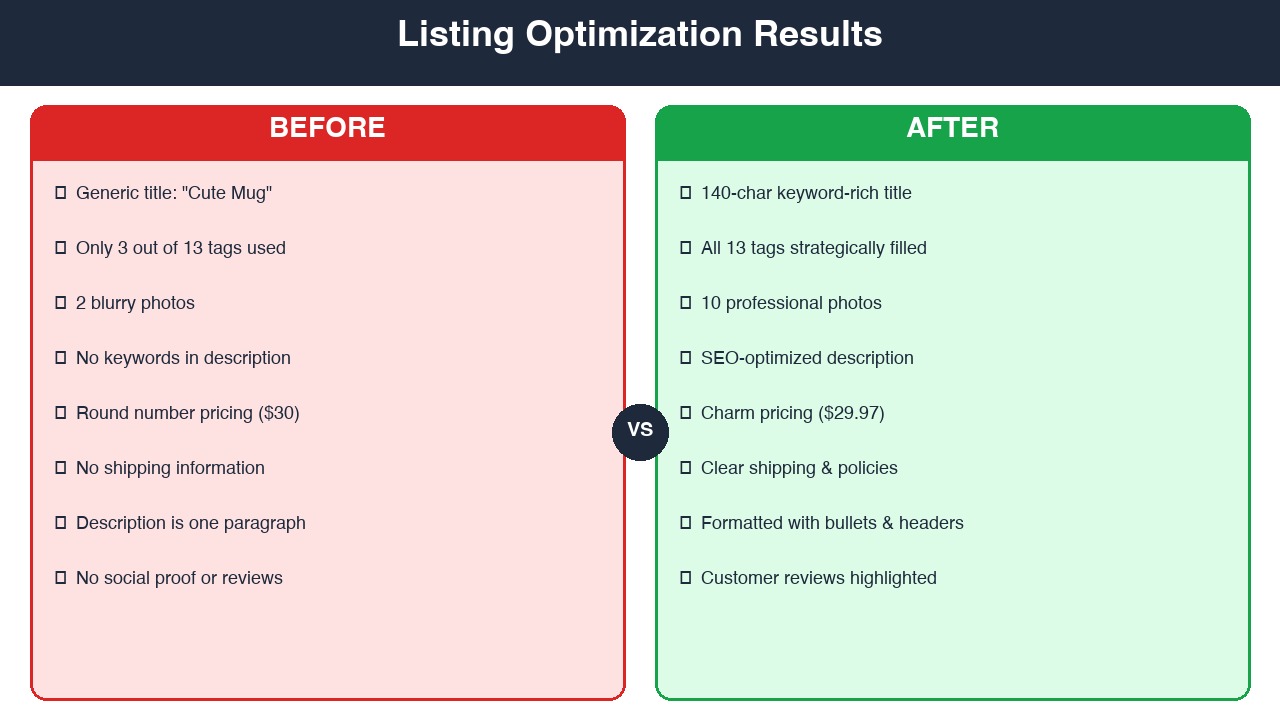
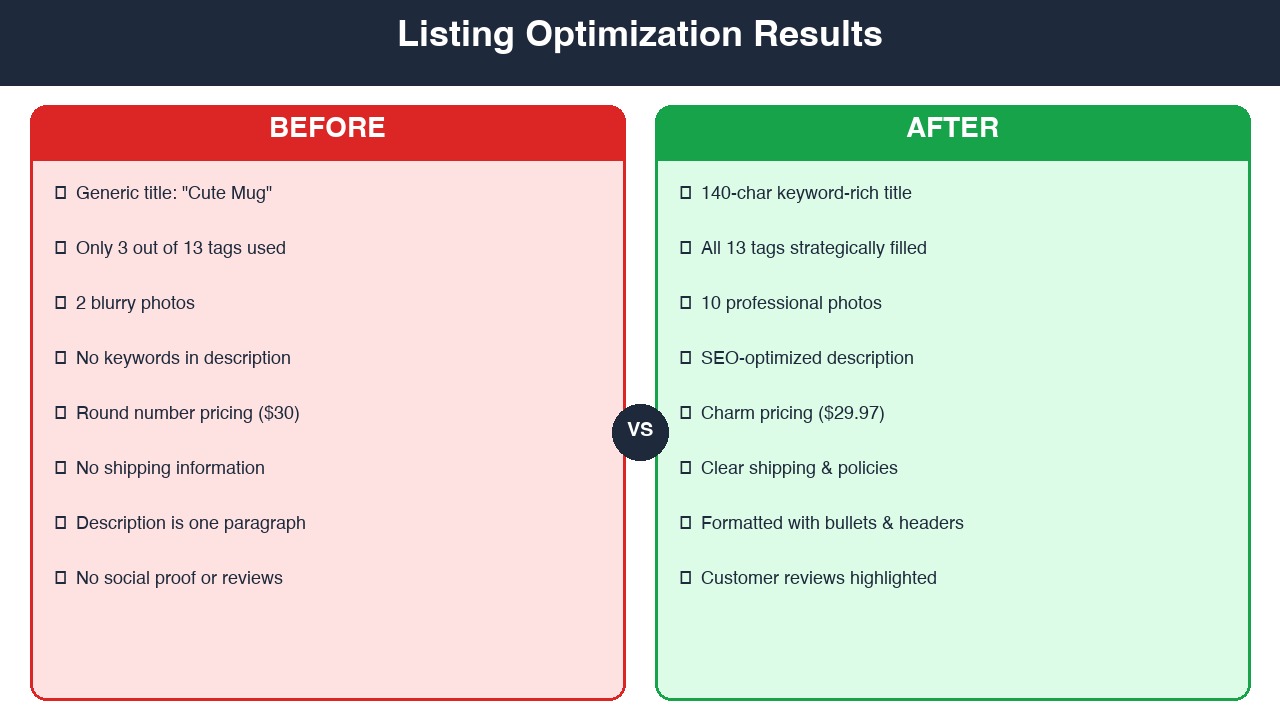
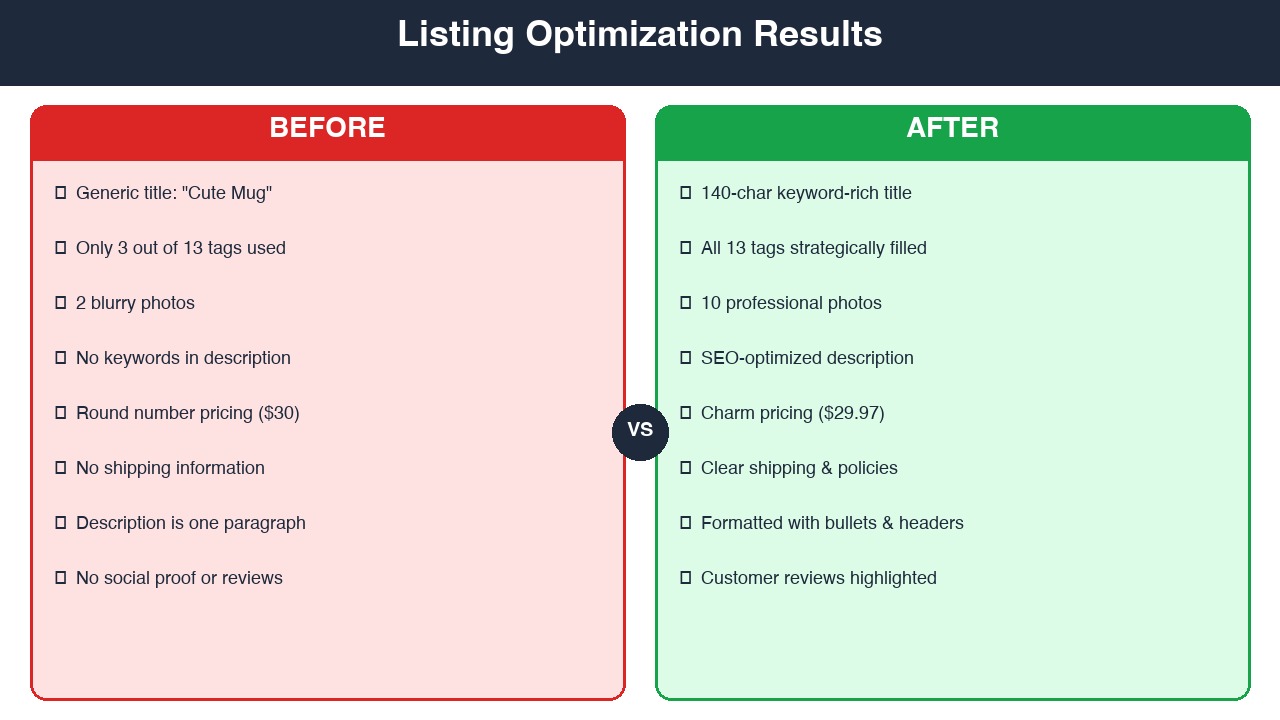
Example: Personalized Leather Journal | Custom Engraved Notebook for Men | 3rd Anniversary Gift
Use all available characters (140 max) but keep it readable. Don't keyword-stuff. Every word should help either the algorithm or the buyer understand what you're selling.
Step 8: Craft Descriptions That Convert
Your description serves two audiences: Etsy's search engine and human buyers. Front-load the most important information:
- First 1–2 sentences: What the product is and why it's special. This appears in search previews.
- Details section: Dimensions, materials, colors, customization options.
- How to order: If you offer personalization, explain exactly what the buyer needs to provide.
- Shipping and care info: Set expectations clearly.
Write naturally. Etsy's algorithm is sophisticated enough to understand context, so repeating your keyword twenty times does more harm than good.
Step 9: Select Tags and Categories
You get 13 tags per listing. Use every single one. Tags should include:
- Your primary keyword and close variations
- Descriptive phrases buyers might search ("gift for mom," "housewarming gift")
- Material or style descriptors ("minimalist," "boho," "sterling silver")
- Occasion or use-case tags ("wedding favor," "birthday present")
Choose the most specific category that fits your product. A ceramic mug should go in Home & Living > Kitchen & Dining > Drinkware > Mugs — not just "Home & Living."
Step 10: Set Your Pricing
Your price needs to cover four things:
- Materials and supplies cost
- Your time (decide on an hourly rate and stick to it)
- Etsy fees (roughly 10–13% of your sale price when you add all fees together)
- Profit margin (aim for at least 30% after all costs)
A simple formula: (Materials + Labor) ÷ 0.55 = Minimum price
This gives you roughly a 45% margin to cover fees, shipping materials, and profit. Adjust based on your niche and competition.
Step 11: Upload Product Photos
Photos are the single biggest factor in whether a buyer clicks your listing. Etsy allows up to 10 images per listing. Use them strategically:
- Image 1 (thumbnail): Clean, well-lit hero shot on a simple background. This is what shows in search results.
- Images 2–3: Different angles and close-ups showing texture, detail, and quality.
- Images 4–5: Lifestyle shots showing the product in use or in context.
- Images 6–8: Size reference, packaging, and variations (if applicable).
- Images 9–10: Infographics showing dimensions, material details, or care instructions.
Etsy recommends images at 2000 × 2000 pixels minimum. Use natural lighting whenever possible.
Phase 3: Launch and Promote
Your shop is set up and your listings are live. Now it's time to drive initial traffic and build momentum.
Step 12: Announce Your Launch
Tell everyone you know. Seriously. Your first sales and reviews will almost certainly come from your network. Share your shop on:
- Personal social media (Instagram, Facebook, Pinterest, TikTok)
- Relevant Facebook groups and Reddit communities (follow each group's self-promotion rules)
- Email — send a personal note to friends and family
Step 13: Optimize for Etsy Search
Etsy's algorithm considers several factors when ranking listings:
- Relevance: How well your title, tags, categories, and attributes match the search query.
- Listing quality score: Based on click-through rate and conversion rate. Better photos and titles mean higher scores.
- Recency: New and recently renewed listings get a temporary boost.
- Shop completeness: Fully filled-out shops rank higher.
- Customer experience: Your review score, response time, and on-time shipping rate all factor in.
Make sure your shop checks every box. The algorithm rewards thoroughness.
Step 14: Consider Etsy Ads (Carefully)
Etsy Ads can accelerate your visibility, but start small. Set a daily budget of $1–$3 and let it run for at least two weeks before evaluating results. Focus ads on your best listings — the ones with the strongest photos and most competitive pricing.
Monitor your click-through rate and return on ad spend weekly. If a listing isn't converting with ads, the problem is usually the listing itself (photos, price, or description), not the advertising.
Step 15: Set Up Social Media Channels
At minimum, create an Instagram and Pinterest account for your shop. These platforms align well with Etsy's visual, handmade-focused audience:
- Pinterest: Create boards organized by product category. Pin your listings with keyword-rich descriptions. Pinterest drives significant traffic to Etsy shops.
- Instagram: Post behind-the-scenes content, product photos, and customer features. Use relevant hashtags and engage with your niche community.
Printable Etsy Shop Setup Checklist
Use this numbered checklist to track your progress. Print it out or save it digitally — check off each item as you complete it.
Phase 1: Before You List
| # | Task | Status |
|---|---|---|
| 1 | Research and validate your niche | ☐ |
| 2 | Check competitor shops and pricing | ☐ |
| 3 | Choose and verify your shop name | ☐ |
| 4 | Secure matching social media handles | ☐ |
| 5 | Create your Etsy account | ☐ |
| 6 | Set up Etsy Payments (bank account, tax ID) | ☐ |
| 7 | Add a billing method for Etsy fees | ☐ |
| 8 | Write your shop policies (returns, shipping, processing time) | ☐ |
| 9 | Complete your About section with a photo and story | ☐ |
| 10 | Design your shop banner (recommended size: 1200 × 300 px) | ☐ |
| 11 | Create a recognizable shop icon/logo (recommended: 500 × 500 px) | ☐ |
Phase 2: First Listing
| # | Task | Status |
|---|---|---|
| 12 | Photograph products (minimum 5 images per listing, natural light) | ☐ |
| 13 | Edit and resize photos to 2000 × 2000 px minimum | ☐ |
| 14 | Write keyword-rich titles (use all 140 characters) | ☐ |
| 15 | Write detailed descriptions (features, dimensions, materials) | ☐ |
| 16 | Add all 13 tags per listing | ☐ |
| 17 | Select the most specific category and attributes | ☐ |
| 18 | Set pricing that covers costs + fees + profit (use the formula above) | ☐ |
| 19 | Set up shipping profiles (weight, dimensions, carrier) | ☐ |
| 20 | Add processing times to each listing | ☐ |
| 21 | Publish at least 10–15 initial listings | ☐ |
Phase 3: Launch and Promote
| # | Task | Status |
|---|---|---|
| 22 | Share your shop link on personal social media | ☐ |
| 23 | Set up an Instagram account for your shop | ☐ |
| 24 | Set up a Pinterest account and create product boards | ☐ |
| 25 | Send a launch announcement to friends, family, email contacts | ☐ |
| 26 | Set an Etsy Ads budget ($1–$3/day to start) | ☐ |
| 27 | Enable Etsy's Star Seller tracking in Shop Manager | ☐ |
| 28 | Install the Sell on Etsy app on your phone | ☐ |
| 29 | Set up email or push notifications for orders and messages | ☐ |
| 30 | Respond to your first inquiry within 24 hours | ☐ |
Product Photography Basics for Etsy
You do not need professional equipment to take strong product photos. Here's what actually works for new Etsy sellers:
Lighting: Natural window light is your best free tool. Set up a table near a large window and shoot during the day. Avoid direct sunlight, which causes harsh shadows. Overcast days provide the softest, most even light.
Background: Start with a clean white poster board or a sheet of white foam core. For lifestyle shots, use simple surfaces like a wooden table, linen fabric, or marble tile. The background should never compete with the product.
Equipment: A modern smartphone camera is sufficient. If your phone is from the last three years, it can produce listing-quality photos. Use a tripod or prop your phone against something stable to avoid blur.
Composition tips:
- Fill the frame with your product — leave minimal dead space.
- Shoot from multiple angles: front, back, top-down, 45-degree angle, and extreme close-up for texture.
- Include a size reference in at least one photo (a hand, a ruler, or a common object).
- Show the product being used or worn if applicable.
Editing: Use free apps like Snapseed or Lightroom Mobile to adjust brightness, contrast, and white balance. Don't over-edit — buyers want to see what the product actually looks like. Consistent editing across all listings gives your shop a cohesive, professional feel.
Shipping Setup for New Etsy Sellers
Shipping can make or break the buyer experience. Etsy gives you several options for managing shipping, and setting this up correctly from the start saves headaches later.
Choose Your Approach
- Calculated shipping: Etsy calculates the shipping cost based on the item's weight, dimensions, and the buyer's address. This is the most accurate method and prevents you from overcharging or undercharging.
- Free shipping: Etsy gives a search ranking boost to listings that offer free shipping on orders of $35 or more in the US. Many sellers build shipping costs into their product price to offer this.
- Fixed shipping: You set a flat rate. Works well if your items are similar in size and weight.
Set Up Shipping Profiles
Create shipping profiles in your Shop Manager under Settings > Shipping Settings. A shipping profile can be applied to multiple listings, so you don't have to re-enter dimensions and weights every time.
For each profile, specify:
- Item weight and dimensions (measure your product packed and ready to ship)
- Processing time (1–3 business days is competitive; be honest about your capacity)
- Domestic carriers (USPS, UPS, FedEx — USPS First Class and Priority Mail are most popular for small items)
- International shipping (decide whether to offer this at launch or add it later)
Supplies You'll Need
Stock up before your first sale arrives:
- Poly mailers or shipping boxes in your most common sizes
- Bubble wrap or tissue paper for padding
- Packing tape and a tape dispenser
- A kitchen scale for weighing packages (accurate to 0.1 oz)
- Shipping labels (you can print them through Etsy for a discount on USPS rates)
- Thank-you cards or small inserts (a personal touch that encourages reviews)
Buying shipping supplies in bulk from Amazon or Uline saves money long-term. Expect to spend $30–$50 on initial supplies.
Branding Your Etsy Shop for Long-Term Growth
Branding is what separates a hobby shop from a business. You don't need to hire a designer — but you do need to be intentional about visual consistency and messaging.
Visual Branding Essentials
- Shop banner: 1200 × 300 pixels. Feature your shop name, tagline, and a visual that represents your products. Canva (free tier) has Etsy banner templates you can customize.
- Shop icon: 500 × 500 pixels. Use a clean logo or a recognizable image. This appears in search results and messages, so it should be legible at small sizes.
- Listing photo style: Maintain a consistent look across all your listings. Same background style, same lighting approach, same editing preset. When a buyer lands on your shop page, the grid should look cohesive.
Messaging and Voice
Define how you communicate with buyers:
- Is your brand warm and friendly? Polished and professional? Playful and casual?
- Use the same tone in your listing descriptions, shop announcement, About section, and message responses.
- Your shop announcement (displayed at the top of your page) should welcome visitors and highlight any promotions, processing time notices, or seasonal information.
Packaging as Branding
Your packaging is part of the customer experience. Even simple touches make a difference:
- Branded stickers or stamps with your shop name
- A handwritten or printed thank-you card
- Consistent wrapping (tissue paper in your brand colors, for example)
- A small insert asking for a review or sharing your social media handles
These details cost pennies per order but significantly increase the likelihood of repeat customers and five-star reviews.
Your First 30 Days: What to Do After Launch
The first month is critical. Etsy's algorithm pays attention to how your shop performs early on, and the habits you build now set the trajectory for your business.
Week 1: Foundation and Feedback
- Check your listings from a buyer's perspective (search for your products and see how they appear)
- Respond to any messages within 24 hours (this metric affects your shop score)
- Ask a friend to place a test order so you can practice the fulfillment process
- Fix any listing errors you catch — typos, wrong dimensions, unclear photos
Week 2: Expand and Optimize
- Add 5–10 more listings to expand your catalog (Etsy favors shops with more active listings)
- Review your Etsy Stats dashboard for search terms driving traffic
- Adjust tags and titles based on what buyers are actually searching
- Start pinning your products on Pinterest daily
Week 3: Build Social Proof
- Follow up with buyers to thank them and gently encourage reviews (never pressure or incentivize)
- Post behind-the-scenes content on Instagram showing your process
- Join relevant Etsy seller groups on Facebook or Reddit for tips and community support
- Research seasonal trends for upcoming holidays or events in your niche
Week 4: Evaluate and Adjust
- Review your shop stats: views, visits, favorites, conversion rate, and revenue
- Identify your top-performing listings and consider creating variations
- Evaluate your Etsy Ads performance and cut ads on underperforming listings
- Set goals for month two: revenue target, number of new listings, review count
- Start researching new product ideas based on customer feedback and search trends
Etsy vs Shopify: Quick Comparison
If you're debating between Etsy and your own website, here's a straightforward comparison:
| Factor | Etsy | Shopify |
|---|---|---|
| Startup cost | $0 to open + $0.20 per listing | $39/month (Basic plan) + domain (~$14/year) |
| Built-in traffic | Yes — over 90 million active buyers already on the platform | No — you must drive all traffic yourself through SEO, ads, and social media |
| Transaction fees | 6.5% + payment processing (~3% + $0.25) | 0% with Shopify Payments (2.9% + $0.30 payment processing on Basic) |
| Control and customization | Limited — you operate within Etsy's design and rules | Full — custom domain, design, branding, and checkout experience |
| Best for | New sellers who want immediate access to buyers and low upfront cost | Established sellers ready to invest in their own brand and marketing |
The bottom line: For most new sellers, Etsy is the best starting point. You get access to millions of buyers without spending a dollar on advertising. As you grow and understand your market, adding a Shopify store alongside your Etsy shop gives you the best of both worlds.
Pros and Cons of Starting on Etsy
Pros
- Massive built-in audience. Etsy has over 90 million active buyers who are specifically looking for handmade, vintage, and unique goods. You do not have to build traffic from scratch.
- Low barrier to entry. No monthly subscription fee. You only pay when you list or sell. This makes it ideal for testing product ideas with minimal financial risk.
- Trust and credibility. Buyers trust Etsy. A new shop on Etsy inherits platform credibility that a brand-new standalone website simply does not have.
- Built-in tools. Etsy provides analytics, shipping label printing, advertising tools, and a mobile app for managing your shop on the go.
- Community and support. Etsy's seller forums, educational resources, and seller handbook provide guidance specifically tailored to creative businesses.
Cons
- Fees add up. Between listing fees, transaction fees, and payment processing, Etsy takes roughly 10–13% of each sale. High-volume sellers feel this more acutely.
- Intense competition. Popular niches are crowded. Standing out requires strong branding, excellent photos, and smart SEO.
- Limited control. You cannot customize your shop's design beyond basic elements. You also cannot collect customer email addresses for direct marketing.
- Algorithm dependence. Your visibility is tied to Etsy's search algorithm, which changes periodically. A ranking drop can significantly impact sales.
- Offsite Ads opt-out restrictions. Shops earning over $10,000 per year cannot opt out of offsite ads, which take a 12% cut of sales generated through those ads (15% for shops under $10,000/year).
Frequently Asked Questions
What do I need to start an Etsy shop?
To start an Etsy shop you need a valid email address, a bank account or debit card for Etsy Payments, product photos, listing descriptions, and your shop name. Etsy charges a $0.20 listing fee per item and takes a 6.5% transaction fee on each sale. You do not need a business license to open a shop, though local regulations may require one depending on your location and sales volume.
How much does it cost to start an Etsy shop in 2026?
Opening an Etsy shop is free. Your ongoing costs include a $0.20 listing fee per item (renewed every four months or upon sale), a 6.5% transaction fee, and payment processing fees of approximately 3% plus $0.25 per transaction. Most new sellers spend between $10 and $50 to launch their first batch of listings, depending on how many products they list and whether they invest in shipping supplies upfront.
Can I start an Etsy shop without inventory?
Yes. Many Etsy sellers operate without physical inventory by selling digital downloads, print-on-demand products, or made-to-order items. Digital products like planners, wall art, and templates are especially popular because there are no shipping costs and the same file can be sold unlimited times. Print-on-demand services like Printful integrate directly with Etsy and handle production and shipping for you.
How long does it take to get your first Etsy sale?
Most new Etsy sellers report getting their first sale within two to six weeks, though this varies widely based on niche competition, listing quality, pricing, and promotion efforts. Sellers who optimize their SEO, share on social media, and list at least 15 to 20 products tend to see sales faster. Patience is important — building consistent traffic takes time.
Is Etsy still worth it for new sellers in 2026?
Yes, Etsy remains a strong platform for new sellers in 2026. With over 90 million active buyers, Etsy provides built-in traffic that standalone websites cannot easily replicate. The key is choosing a viable niche, optimizing your listings for Etsy search, and providing excellent customer service to build reviews. Many successful Etsy sellers eventually expand to their own website while keeping their Etsy shop active as an additional sales channel.
Do I need a business license to sell on Etsy?
Etsy does not require a business license to open a shop. However, your local city, county, or state may require a business license or sales tax permit depending on your location and revenue. It is advisable to check your local regulations and consult a tax professional as your shop grows. In the US, if you earn over $600 from Etsy in a calendar year, Etsy will issue a 1099-K form for tax reporting purposes.
Sources and Methodology
This article was compiled using the following sources and methods:
- Etsy Seller Handbook: Official documentation from Etsy on fees, policies, and best practices. Fee figures ($0.20 listing fee, 6.5% transaction fee, payment processing rates) are sourced directly from Etsy's published fee structure.
- Etsy's public financial reports: Active buyer counts and platform growth data referenced from Etsy's most recent investor communications and quarterly earnings reports.
- Seller community research: Insights on timeline to first sale, pricing strategies, and promotional tactics were informed by discussions across Etsy seller forums, the r/Etsy subreddit, and established Etsy seller communities on Facebook.
- Platform comparison data: Shopify pricing sourced from Shopify's published plan details. Feature comparisons reflect publicly available information from both platforms.
- Author experience: Jordan Ellis has covered e-commerce platforms and small business operations since 2019, with specific expertise in marketplace seller strategy and SEO.
All fee figures were verified against Etsy's official fee policy page. This article will be reviewed and updated quarterly to reflect any platform changes.
Launching an Etsy shop doesn't have to be overwhelming. Print out the checklist above, work through it step by step, and you'll go live with a shop that's built to attract buyers from day one. Bookmark this etsy shop setup checklist and come back to it as you work through each phase — your future customers are already searching.